Rockford - Fullscreen Photography WordPress Theme


A fancy and versatile theme for photographers and artists.
Testimonials
5 Stars! Absolute well built theme! Easy and would recommend to anyone.
zackrogers561561
Great website portfolio for photographers and artists. The main expression: “Premium Photography Theme”. Very innovative design and approach. Menu is from right side. Default journal (blog) is in the center of the page (homepage). It looks for me like a very professional theme. Transparent with some pages, like contact. Full-screen photos.
Douglas Hallor
New features in version 1.1.9
- Added the ability to disable the page header on Showcase page template
- New option on portfolio that allow to change the portfolio item link with a custom url
New features in version 1.1.5
- Added the top opening for the menu expansion position
- Added the option for auto fit images on the Showcase page template and the single work
- Improved usability of the slideshow by put the slideshow arrows always visible
New feature in version 1.1.2
- Added the ability to fix the header position. View the demo
New features in version 1.1
- Added the ability to choose the menu expansion position.
- Added a “Back to Portfolio” link to the single Portfolio item page.
- Added video support for extended header in pages.
- Improved Typekit support for the theme Customizer.
Theme highlights:
- Retina ready
- Video support, Vimeo, YouTube and Self-hosted
- Multiple logo & menu layout
- Black and White skins
- Full blown post formats support
- Super quick live appearance customization
- Portfolio post type
- AJAX dynamic Portfolio filter
- AJAX Photogallery functionality
- ... and a lot more!
Features video tour
- 0:07 Theme options
- 01:37 Logo and menu
- 02:45 Social links
- 03:14 Footer sidebar
- 04:25 Page header
- 09:28 Portfolio
- 13:27 Single work
- 16:19 Photogallery
- 19:45 Fonts and appearance
- 23:59 Framework options
FULL-SCREEN PICTURES You can use full-screen images pretty much everywhere throughout the theme, especially in pages and Portfolio items.
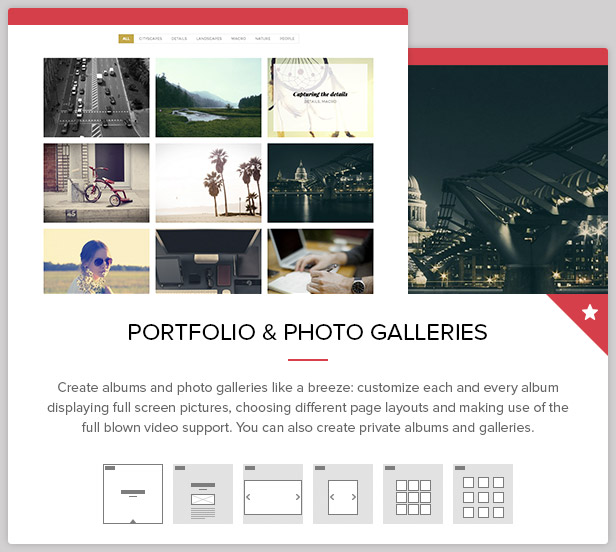
PHOTO ALBUMS Albums are our take at how an efficient Portfolio and works showcase can be managed: you can create albums and photo galleries like a breeze, customizing each and every album displaying full screen pictures, choosing different page layouts and making use of the full blown video support. You can also create private albums and galleries.
FLEXIBLE Choose from different page header layouts and be able to use full-screen images at the top of your page, or completely disable the header.
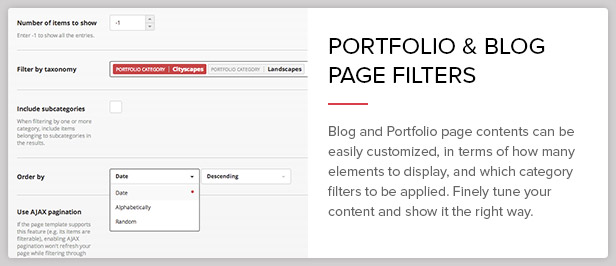
FINELY TUNED BLOG Rockford is a solid choice for your blogging purposes too, thanks to its several layout variants and options. Blog and Portfolio page contents can be easily customized, in terms of how many elements to display, and which category filters to be applied, which means you can finely tune your content and show it the right way.






Change log:
View the complete changelog
Note:
All images are from Unsplash.com licensed under CC0 license.


HI There. Please help – How can I disable the Title and Subtitle on the WORKS/ PORTFOLIO pages only – the other titles are fine on other pages, I just want the visitor to see the images without anything on top – I know how to disable the overlay – so, just the TITLE and SUB-TITLE please – anyone?
ReplyDeleteHi there, you can do that with some custom CSS. For example, if you have selected the Portfolio page template, you could do something like this:
ReplyDelete.page-template-template-portfolio-php .thb-container.top { display: none; }
Thanks for the fast reply – Where do I put this – Do I put it in the THEME OPTIONS – CUSTOM CSS? and exactly as you commented – will this disable only all portfolio/works titles and sub-titles?
ReplyDeleteThanks in advance, FURSKI
I entered this
ReplyDelete.page-template-template-portfolio-php .thb-container.top { display: none; }
into the custom css in the theme appearance/custom css but no changes took effect – can you help please, I’m just ready to go live and this is holding me up
thanks in advance
Furski
Hi there,
ReplyDeletethe aforementioned code is working for the portfolio pages since the single works have a different header structure, by the way, can you share with us a link to your installation?
Hi. You haven’t updated this theme since April 2015. Are you not supporting it anymore? Just wondering because it’s a great looking theme, but I’m a little iffy with purchasing older themes that haven’t been updated in a while.
ReplyDeleteThanks!
Hey there,
ReplyDeletethanks for your interest in Rockford. As you’ll surely understand, old themes aren’t updated as frequently as newer ones, for various reasons. In the case of Rockford, though, the item is still supported, and should an issue come up, we’d definitely update it.
Feel free to ask us more questions about it, if you like