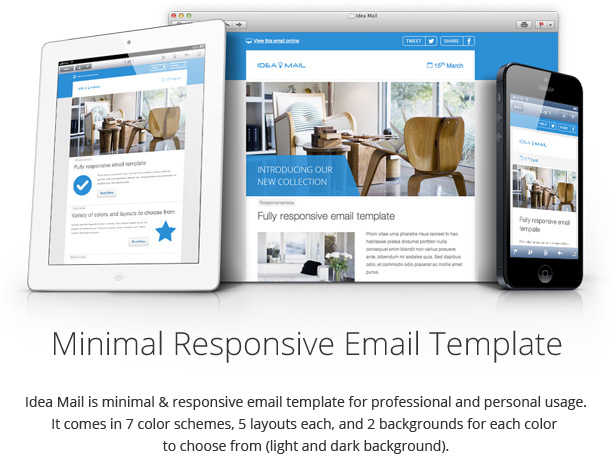
Idea Mail - Minimal & Responsive Email Template Marketing
Themeforest Idea Mail - Minimal & Responsive Email Template Marketing
If you like the template, please remember to give a minute of your time to rate it
Images by tommerton2010 (Images from live preview are not included in the download package).



Features
- 70 Responsive HTML email templates (7 color themes, 2 background versions, 5 layouts).
- Responsive email template based on fluid structure and Media Queries with ability to remove responsiveness.
- Layered elements PSD files (so you create your own color scheme or edit any used elements).
- Well commented valid HTML code.
- Ready to use “Tweet” and “Facebook share” buttons (powered by AddThis).
- Mailchimp version (70 email templates with Mailchimp’s merge tags).
- User friendly documentation covers PSD & HTML editing, useful tips, sending the template, using it in Aweber, Mailchimp and Constant Contact.
- You can copy/paste/delete/duplicate content blocks (tables) from layout to another to create your custom layout.
- Titles use Segoe UI font (common on Windows), if recipient doesn’t have it installed it uses Helvetica Neue (common on Mac), if none installed it uses default Helvetica and Arial fonts.
Compatibility
- Idea Mail is compatible with all major email clients & internet browsers (even Outlook 2000 and Internet Explorer 5.5 !), check out the live preview for screenshots of Idea Mail on different email clients and devices.
- It can be used in email programs or online services which support importing/editing HTML code (such as Aweber, Mailchimp, Vertical Response, etc…), although the email template renders correctly in Outlook 2007-2013 it’s not recommended to use Outlook to send it to your clients.
- If you are planning to use this template in Constant Contact or iContact please read this.
Update
Version 1.1 [18 March 2013]
- Added Mailchimp version (70 email templates with Mailchimp's merge tags).
Share the love!
If you like the template, please remember to give a minute of your time to rate it
Credits
Images by tommerton2010 (Images from live preview are not included in the download package).
If you like this template you may also like:


I’m having issue when adding the html to constant contact, the view of the email on a mobile device is not the same as the view on a mobile browser. Take a look https://whatthetrucks.com/marketing/email/html/wtt_newsletter_2_1.html
ReplyDeleteHi Dookans,
ReplyDeleteThanks for purchasing Idea Mail, please read the following FAQ about Constant Contact, if you are ever able to send the email with a valid doctype declaration then it will remain responsive.
In addition, the first line in the code is:
<?xml version="1.0" encoding="iso-8859-1"?>
You need to remove it to keep the original docytpe declaration active.
Regards.
HI there,
ReplyDeleteIm new to using templates for emails. Currently I have been desiging in Photoshop, using layered masks etc, then slicing and exporting as html and images.
Taking this html code into our email sending program (sendpepper) and adding images back in.
Its a slow fiddly process.
With these templates, how are we meant to add content to it?
There is no email builder program so Im not sure how design changes/layouts are made?
Thanks for your help.
brian
Hi Brian,
ReplyDeleteThanks for your interest in Idea Mail, the template comes with elements Photoshop file with placeholder images (with masks and slices) where you can easily place your images instead of the placeholder images and export the updated slices.
Idea Mail is HTML email template so you can edit it in any WYSIWYG editor or directly in your email marketing visual editor if it allows importing and editing HTML templates, while you are editing it you can update the text and images, if you wish to edit the layout by adding or removing content modules, such modules have code comments such as <!-- Start of banner --> and <!-- End of banner --> which makes it easily recognized to duplicate or delete the code (the help documentation covers such edits in more details).
If you are planning to use the template in Sendpepper, it’s important to make sure if Sendpepper service doesn’t strip the doctype declaration in order to make the template responsive in Webkit browsers, otherwise you can remove the media queries and use the template as non responsive, more info.
Regards.
Hi, I was wondering if you have made an Instagram social icon for the form? If so, would you be kind enough to share? AWESOME email template by the way!
ReplyDeleteHi WheresMyHippo,
ReplyDeleteThanks for purchasing Idea Mail. Yes I have the Instagram icon, here is the link.
Regards.
I’m using constant contact – where can I find documentation on how to incorporate the dynamic elements when used with that service (view this email online, tweet this, share this, unsubscribe, etc)
ReplyDeleteHi shirtandsimple,
ReplyDeleteThanks for purchasing Idea Mail, here are couple constant contact codes:
Forward to a friend:
<Forward>Forward to a friend</Forward>
Unsubscribe:
<SignupLink type="optout">Unsubscribe</SignupLink>
For the tweet and facebook buttons you can use the provided code from addthis.com, you only need to edit the URL as explained in the help documentation.
At the moment I don’t see any constant contact custom sharing or view online codes available in their user guide, so please contact their support in case you are looking for those codes or any other custom codes.
Regards.