Hairpress - HTML Template for Hair Salons


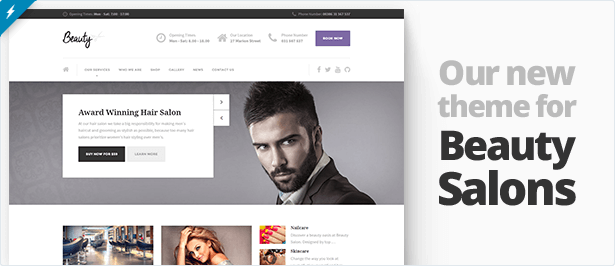
 |  |
Responsive HTML template Hairpress is perfect for hair salons, beauty salons and other similar local business.

We don’t provide support for our HTML templates.
NEW in v1.4.1! Make an appointment working PHP form added
In the new version the working PHP form on the Make an appointment page has been added. Take a look at it here: http://www.proteusthemes.com/themes/hairpress/make-an-appointment.php
NEW in v1.4! jQuery UI datepicker added
The jQuery UI datepicker has been added to the theme, you can check the functionality on the preview page (Date field).
NEW in v1.3! Single blogpost page and search results added
In the latest version of Hairpress HTML Template two new layouts were added:
NEW in v1.2! Working PHP contact form added
A new file has been added to the theme – contact.php. It looks exactly the same as the contact.html, except that it makes the contact form actually useful – one can send the message directly from the website to your email address.

Note that you need the PHP server with mail() function to make the PHP contact form work properly. All the details about the implementation are covered in docs.
NEW in v1.1! Nine new icons for content dividers added
With 9 new (and 1 default – scissors) content dividers the Hairpress template can be used for just any type of website.

The theme color creation is just a matter of changing three SASS variables in the main.scss file, so this template is appropriate for any topic.
Page Layouts
Hairpress includes twelve different page layouts, including:
- Home
- Blog
- Single Blogpost
- Search Results
- Gallery
- Contact Us
- About Us
- Make an Appointment
- Services
The theme comes with all 20 PSDs created by professional designer, so it is very easy to add some extra visual elements to the existing design.
Using SASS, Compass and Twitter Bootstrap
The template is build on top of SASS Twitter Bootstrap front-end framework and uses Compass functions for creating sprite images (good for a performance). Hairpress HTML template has five color themes already available and custom theme creating is just a matter of changing the three custom SASS variables and recompiling the CSS files (all described in documentation).
You can still use all the components available from Twitter Bootstrap, nothing was changed in core during the development.
Fonts Used
These two fonts are used in the template from the Google Fonts
Lobster – for the logo in the navbar
PT Sans – for headings and links
Images and Licenses
The images used for the demo page were bought on photodune.net and because of licenses come blurred in the zip file for download.
Changelog
v1.8.0 (2014-01-27) --- added the JavaScript implementation for the current highlighted day in the opening time, updated Slider Revolution
v1.7 (2013-09-04) --- added many social icons
v1.6 (2013-06-15) --- removed the Tweet mod plugin, implemented the Twitter Widget
v1.5 (2013-05-02) --- the Tweet jQuery plugin updated, API v1.1 credentials needed for Twitter stream
v1.4.1 (2013-02-16) --- the working appointment form written in PHP added
v1.4 (2013-02-05) --- jQuery UI Datepicker added
v1.3 (2013-01-31) --- single post and search results added
v1.2 (2013-01-21) --- PHP contact form added
v1.1 (2013-01-17) --- added nine different icons for content dividers
v1.0.1 (2013-01-16) --- the navigation added to the docs, fixed the links in the footer menu
v1.0 (2013-01-15) --- first version of the Hairpress HTML Template


Hi, I love this template and I would want to purchase and customise it for my wifes hair salon business. I just need abit of clarifications?
ReplyDeletePlease what is the difference between the Wordpress version and the html version. Will I be able to edit all the text and change all the images using any html editor like dreamweaver. I know a bit of css, html but never used wordpress before. Which one would you advise I purchase, considering ease to use and customisation. Is the price a monthly payment or one off. Thank you
Hi,
ReplyDeleteThank you for your interest.
HTML version comes with HTML and CSS files, you can edit the content manually, directly in the code with software like Dreamweaver.
WP version should be installed in the WordPress installation that you already have installed somewhere on the server (we can also do this for you according to http://www.proteusthemes.com/pricelist.html ). WP gives you powerful interface so editing and adding the content is much easier and there is no transferring files over FTP to server involved. Take a look how the installation looks like: http://youtu.be/whRMhLhFF2s
If you are already familiar with basics of HTML, then I guess it will be easier for you to start editing the content in HTML, but on the long run WordPress is much easier to handle, update and maintain.
Both are one off payments.
Primoz
Hello,
ReplyDeleteLike an idiot I purchased the wrong theme. I need the Wordpress ready theme and was wondering if my funds paid for the html can be put towards the purchase of the Wordpress theme. I can make the purchase asap just need to know.
Thank You
Hi
ReplyDeleteyou need to contact Envato and explain them your situation, we really can’t help you with this, I’m so sorry! Let me know how it goes and take care.
I just need a website for a small hair salon and no sales is needed. should I just get the HTML version or should I get the Wordpress version
ReplyDeleteHi,
ReplyDeleteno matter that I would suggest you choose WP version, because it it easier to set up and maintain on the long run. With the HTML version you need to have some advanced knowledge (and experiences).
Is this a bootsrap HTML template?
ReplyDeleteYes, Bootstrap version 2.3.x
ReplyDeleteis this mobile friendly? how does it fare with google’s PageSpeed Insights test?
ReplyDeletethanks..
Hi,
ReplyDeleteBest that you test it out yourself and see
https://www.proteusthemes.com/themes/hairpress/
https://www.google.com/webmasters/tools/mobile-friendly/?url=https%3A%2F%2Fwww.proteusthemes.com%2Fthemes%2Fhairpress%2F
I love this theme, but I do not like the colors at the bottom. Can the black be changed to another color?
ReplyDeleteHi,
ReplyDeleteyou can change more or less all colors in live customizer and of course with Custom CSS.
Hi i have purchased this theme, I would like to know how can i activate the sliding banner in mobile devices? Can you please tell me where i have to change the responsive setting for the sliding banner?
ReplyDeleteHi,
ReplyDeletefind this line `if (myWidth > 767) {` in js/custom.js file. Change it to 1 an it should work on mobile…
Hi, i have a Problem if i send äüö with the contact form can you give me a code fix or new send-email.php … Thank you
ReplyDeleteHi,
ReplyDeleteTry to change this code in send-mail.php:
mail( $recipient, $subject, $body, "FROM: ".$fields['email'][0] )
with this one:
mail( $recipient, $subject, $body, "FROM: ".$fields['email'][0] . "\r\nContent-type: text/html; charset=UTF-8" . "\r\n" )
Hi, Pre-sale question: possible to have appointment form on the slider instead of opening time ? 2. Possible to have drop down service details to choose on the appointment form ? 3. on mobile , cannot see slider text and also remove opening time ? Regards Gurpreet
ReplyDeleteHi,
ReplyDeleteyes, everything is possible, if you will change the code, because this is a HTML version of HairPress.
If you are looking for WordPress-ready theme, follow this link: http://goo.gl/9zpCkW
Hello. I want to purchase your template, but I was wondering if I people who visit the website can book appointments on there too. If so, is this already in the template or do I have to change some of the coding. Appreciate the response back.
ReplyDeleteThanks
Hi,
ReplyDeleteno, it’s not included, you should code it on your own.
Ok. On the “make an appointment” slide. When the information boxes are filled and the button is clicked does that go to the email address that is listed in the coding? Sorry if I sound a bit confusing, I’m still learning
ReplyDeleteHi,
ReplyDeleteYes, the working form is included, written in PHP and sends an email to your address. Documentation on that comes with the theme.
Thanks. I will be purchasing this theme
ReplyDeleteThank you!
ReplyDeleteHow can I edit the .title-area? Instead of the background being grey I would like to add my own as a saved jpg. by chance. This is really the only block thats in the way. Everything else is wonderful.
ReplyDeleteHi, please refer to http://support.proteusthemes.com/ for support and thank you for your cooperation. We offer support only on our support platform.
ReplyDeleteWhy I bought the template and receive spam every day? I only used my email here .
ReplyDeleteHi,
ReplyDeletewe don’t send spam or any other emails to those who just buy our themes/templates…
If I wanted to add a maximum amount of times I could get appointments made could I add coding for that? If so how? Meaning if I got to 50 appointments made for that week at the maximum could I not accept any more than that. Or have it show a message that the maximum amount of amount of appointments have been made for that week.
ReplyDeleteHi,
ReplyDeletethis is a custom code and I’m afraid this can’t be part of our free support.
Ok. How would I go about having you help me with this situation. I’m still pretty new to this. How much does the support cost?
ReplyDeleteHi,
ReplyDeleteSorry, we are not available for such modifications. I recommend finding a freelancer who will be able to help you out.
Hi,
ReplyDeleteDoes not work send an e-mail. I typed your email address to send the file-email.php but sending a message does not work, please help. I guess this file send-email.php does not work.
Hi, thank you very much for your comment, but as you were able to see upon purchase, we do not provide 1-on-1 support for this theme anymore. However, in our support portal you will be able to find an extensive knowledge base, public forum and theme documentation. Thank you very much for understanding.
ReplyDelete